Spring Boot Integration With MongoDB as a Maven Project
Last Updated :
23 Jul, 2025
MongoDB is a NoSQL database and it is getting used in software industries a lot because there is no strict schema like RDBMS that needs to be observed. It is a document-based model and less hassle in the structure of the collection. In this article let us see how it gets used with SpringBoot as a Maven project.
Implementation
Project Structure:

As it is a maven project, let's start with adding dependencies via
pom.xml
XML
<?xml version="1.0" encoding="UTF-8"?>
<project xmlns="https://maven.apache.org/POM/4.0.0"
         xmlns:xsi="https://www.w3.org/2001/XMLSchema-instance"
         xsi:schemaLocation="https://maven.apache.org/POM/4.0.0
                             https://maven.apache.org/xsd/maven-4.0.0.xsd">
    <modelVersion>4.0.0</modelVersion>

    <groupId>com.gfg</groupId>
    <artifactId>SpringBoot_MongoDB_SampleProject</artifactId>
    <version>0.0.1-SNAPSHOT</version>
    <packaging>jar</packaging>

    <name>SpringBoot_MongoDB_SampleProject</name>
    <description>SpringBoot_MongoDB_SampleProject</description>

    <parent>
        <groupId>org.springframework.boot</groupId>
        <artifactId>spring-boot-starter-parent</artifactId>
        <version>2.0.0.RELEASE</version>
        <relativePath/>
    </parent>

    <properties>
        <project.build.sourceEncoding>UTF-8</project.build.sourceEncoding>
        <project.reporting.outputEncoding>UTF-8</project.reporting.outputEncoding>
        <java.version>1.8</java.version>
    </properties>

    <dependencies>
        <dependency>
            <!-- For MongoDB connectivity -->
            <groupId>org.springframework.boot</groupId>
            <artifactId>spring-boot-starter-data-mongodb</artifactId>
        </dependency>
        <dependency>
            <groupId>org.springframework.boot</groupId>
            <artifactId>spring-boot-starter-web</artifactId>
        </dependency>
    </dependencies>
    <build>
        <plugins>
            <plugin>
                <groupId>org.springframework.boot</groupId>
                <artifactId>spring-boot-maven-plugin</artifactId>
            </plugin>
        </plugins>
    </build>
</project>
File to mention the connectivity with MongoDB database
application.properties
#mongodb properties
spring.data.mongodb.host=localhost
spring.data.mongodb.port=27017
spring.data.mongodb.database=geeksforgeeks # Change the database as per your choice here
Let's start with the bean (document) file first
Book.java
Java
import org.springframework.data.annotation.Id;
import org.springframework.data.mongodb.core.mapping.Document;

@Document(collection = "book")
public class Book {

    @Id
    private String id;

    private long bookId;

    private String isbnNumber;

    private String category;

    private String bookName;

    public String getId() {
        return id;
    }

    public void setId(String id) {
        this.id = id;
    }

    public long getBookId() {
        return bookId;
    }

    public void setBookId(long bookId) {
        this.bookId = bookId;
    }

    public String getIsbnNumber() {
        return isbnNumber;
    }

    public void setIsbnNumber(String isbnNumber) {
        this.isbnNumber = isbnNumber;
    }

    public String getCategory() {
        return category;
    }

    public void setCategory(String category) {
        this.category = category;
    }

    public String getBookName() {
        return bookName;
    }

    public void setBookName(String bookName) {
        this.bookName = bookName;
    }
}
BookRepository.java
Java
import java.util.List;
import org.springframework.data.mongodb.repository.MongoRepository;
import com.gfg.docs.Book;

public interface BookRepository extends MongoRepository<Book,Long> {
    // Need to add all the required methods here
    List<Book> findByCategory(String category);
    Book findByBookId(long bookId);
}
Let's add the service file now
BookService.java
Java
import java.util.List;
import org.springframework.beans.factory.annotation.Autowired;
import org.springframework.stereotype.Service;
import com.gfg.docs.Book;
import com.gfg.repository.BookRepository;

@Service
public class BookService {
    @Autowired
    BookRepository bookRepository;
    public List<Book> getAllBooks(){
        return bookRepository.findAll();
    }

    // Getting a specific book by category from collection
    public List<Book> getBookByCategory(String category){
        List<Book> book = bookRepository.findByCategory(category);
        return book;
    }

    // Getting a specific book by book id from collection
    public Book getBookByBookId(long bookId){
        Book book = bookRepository.findByBookId(bookId);
        return book;
    }

      // Adding/inserting a book into collection
    public Book addBook(long id,String isbnNumber, String bookName,String category) {
        Book book = new Book();
        book.setCategory(category);
        book.setBookId(id);
        book.setBookName(bookName);
        book.setIsbnNumber(isbnNumber);
        return bookRepository.save(book);
    }

    // Delete a book from collection
    public int deleteBook(long bookId){
        Book book = bookRepository.findByBookId(bookId);
        if(book != null){
            bookRepository.delete(book);
            return 1;
        }
        return -1;
    }
}
Now let's go to the controller file
BookController.java
Java
import com.gfg.docs.Book;
import com.gfg.service.BookService;
import org.springframework.beans.factory.annotation.Autowired;
import org.springframework.web.bind.annotation.RequestMapping;
import org.springframework.web.bind.annotation.RequestParam;
import org.springframework.web.bind.annotation.ResponseBody;
import org.springframework.web.bind.annotation.RestController;
import java.util.List;

@RestController
public class BookController {

    @Autowired
    BookService bookService;
    @RequestMapping("/getAllBooks")
    @ResponseBody
    public List<Book> getBooks(){
        return bookService.getAllBooks();
    }

    @RequestMapping("/getBook")
    @ResponseBody
    public List<Book> getBook(@RequestParam("category") String category){
        return bookService.getBookByCategory(category);
    }

    @RequestMapping("/getBookById")
    @ResponseBody
    public Book getBookById(@RequestParam("bookId") long bookId){
        return bookService.getBookByBookId(bookId);
    }

    @RequestMapping("/addBook")
    @ResponseBody
    public String addBook(@RequestParam("bookId") long bookId,@RequestParam("isbnNumber") String isbnNumber,
                          @RequestParam("bookName") String bookName,
                          @RequestParam("category") String category){
        if(bookService.addBook(bookId,isbnNumber,bookName,category) != null){
            return "Book got  Added Successfully";
        }else{
            return "Something went wrong !";
        }
    }

    @RequestMapping("/deleteBook")
    @ResponseBody
    public String deleteBook(@RequestParam("bookId") int bookId){
        if(bookService.deleteBook(bookId) == 1){
            return "Book got  Deleted Successfully";
        }else{
            return "Something went wrong !";
        }
    }
}
Main file that contains the main method and can be used to run as a Java application
Application.java
Java
import org.springframework.boot.SpringApplication;
import org.springframework.boot.autoconfigure.SpringBootApplication;

@SpringBootApplication
public class Application {

    public static void main(String[] args) {
        SpringApplication.run(Application.class, args);
    }
}
Steps to clean the project
mvn clean install # As this is maven project
Run the project
mvn spring-boot:run
Output:

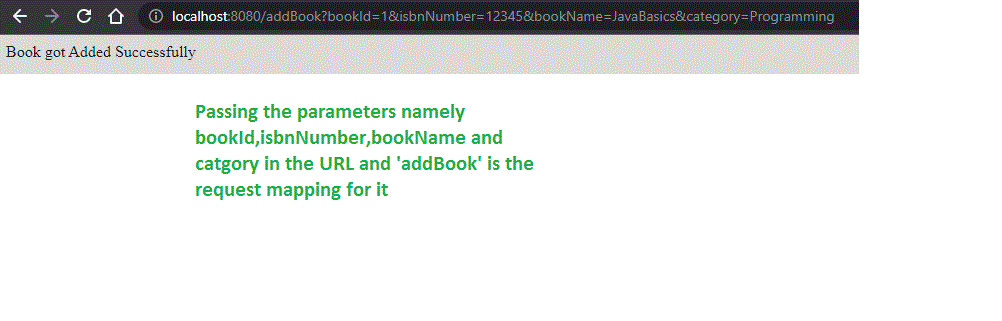
We can test the same in the below ways. First, let us add the book
URL: http://localhost:8080/addBook?bookId=1&isbnNumber=12345&bookName=JavaBasics&category=Programming
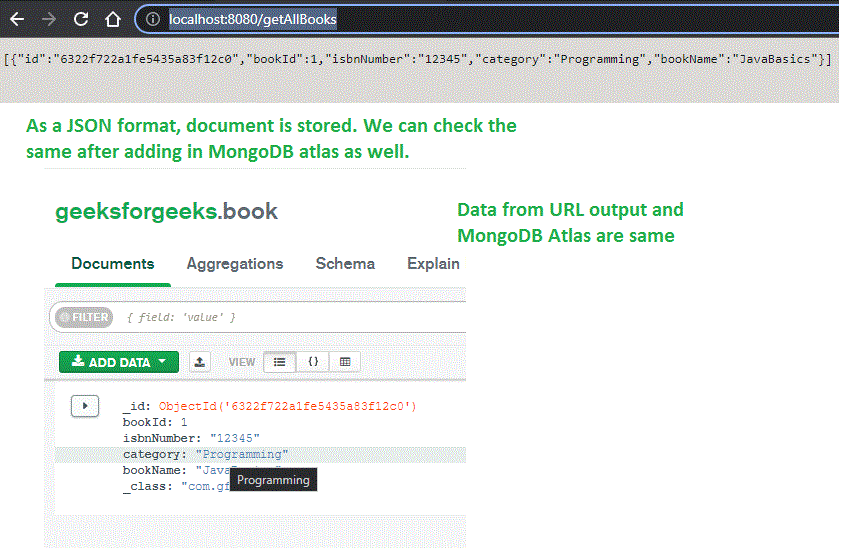
Now list out the books
URL: http://localhost:8080/getAllBooks
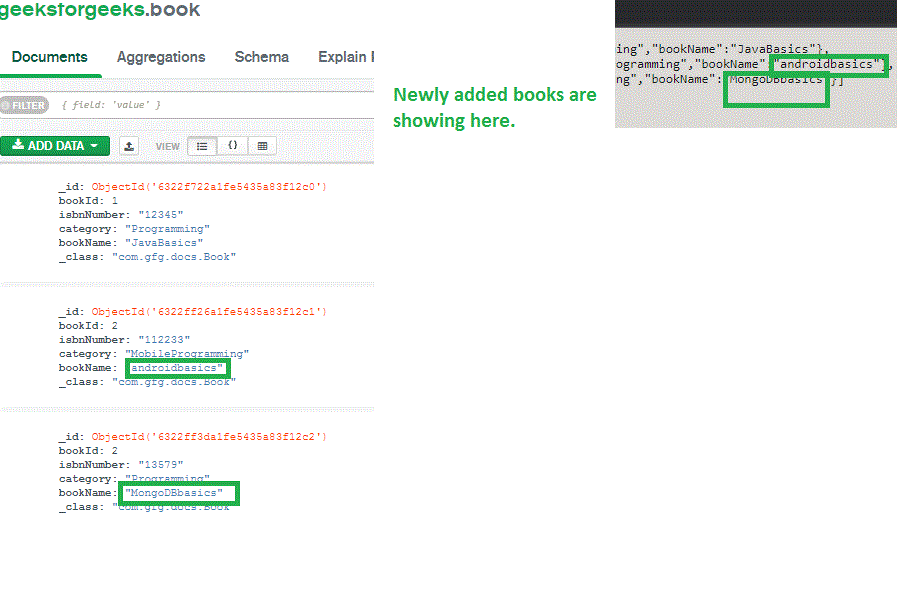
Let's add 2 more books
We can search books by means of category
URL: http://localhost:8080/getBook?category=Programming

Similarly, we can do it by bookId as well
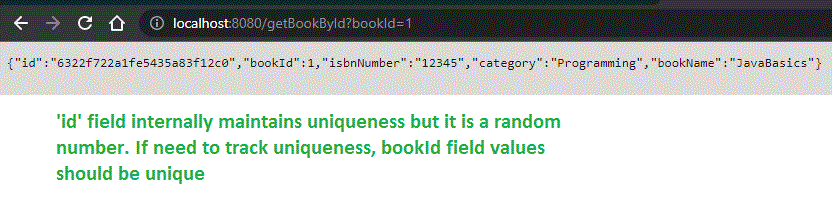
Like this, we can do all business logic as per our needs. It is quite easier to integrate MongoDB with SpringBoot technologies.
Explore
Spring Boot Basics and Prerequisites
Spring Boot Core
Spring Boot with REST API
Spring Boot with Database and Data JPA
Spring Boot with Kafka
Spring Boot with AOP