How to add theme to your webpage using Bootswatch in React JS project ?
Last Updated :
23 Jul, 2025
Bootswatch is an open-source project, that provides several free themes for Bootstrap that a web developer can use. It helps the developer to get proper UI without spending hours and energy on styling different elements.
Prerequisites:
Approach to add theme using Bootstrap:
- The
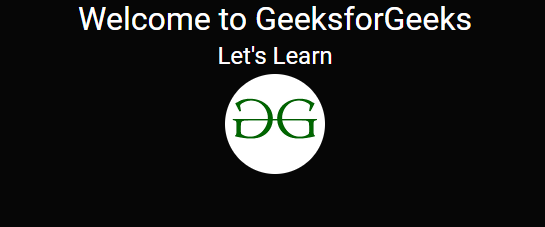
Home.js file contains a React functional component named Home. - The component renders a heading welcoming users to GeeksforGeeks and encouraging them to learn.
- To center the image, the component uses the
Row component from the 'react-bootstrap' library with the class "justify-content-md-center." - The image, sourced from the GeeksforGeeks website, is displayed as a rounded circle using the
Image component from 'react-bootstrap' with the attributes src, roundedCircle, and fluid.
Steps to Create React Application And Installing Module:
Step 1: Create a React application using the following command:
npx create-react-app example
Step 2: After creating your project folder i.e. example, move to it using the following command:
cd example
Step 3: Installing required dependencies.
npm install react-bootstrap bootstrap
Project Structure:
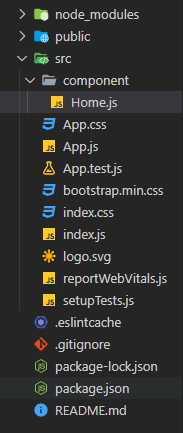
The updated dependencies in package.json file will look like:
"dependencies": {
    "bootstrap": "^5.3.2",
    "react": "^18.2.0",
    "react-bootstrap": "^2.9.0",
    "react-dom": "^18.2.0",
    "react-scripts": "5.0.1",
    "web-vitals": "^2.1.4",
}
Example: Remove the unnecessary things from this file and add the below code and Create a functional component in the file, like below. Now add any bootstrap component in your react.js application and it will be styled according to the theme.
JavaScript
import React from 'react';
import ReactDOM from 'react-dom';
import './index.css';
import App from './App';
import reportWebVitals from './reportWebVitals';

// Import downloaded theme
import './bootstrap.min.css';

ReactDOM.render(
  <React.StrictMode>
    <App />
  </React.StrictMode>,
  document.getElementById('root')
);
reportWebVitals();
import './App.css';
// Importing Home component
import Home from './component/Home';

function App() {
  return (
    <div className="App">
      <Home />
    </div>
  );
}

export default App;
//Home.js

import React from 'react';
import {Image , Row} from 'react-bootstrap';

const Home = () => {

    return (
        <div>
            <h1>Welcome to GeeksforGeeks</h1>
            <h2>Let's Learn</h2>

            {/* aligning the image at the center */}
            <Row className="justify-content-md-center">
               <Image src=
"https://www.geeksforgeeks.org/wp-content/uploads/gfg_200X200-1.png"
                      roundedCircle fluid />
            </Row>
        </div>
    )
}

export default Home
Start the Server: Run the below command to start the server.
npm start
Output: The applied theme is Cyborg (dark theme) and here is the output.
Explore
React Fundamentals
Components in React
React Hooks
Routing in React
Advanced React Concepts
React Projects