Pyspark dataframe: Summing column while grouping over another
Last Updated :
29 Dec, 2021
In this article, we will discuss how to sum a column while grouping another in Pyspark dataframe using Python.
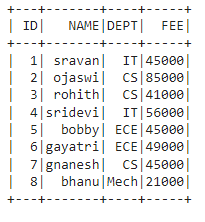
Let's create the dataframe for demonstration:
Python3
# importing module
import pyspark

# importing sparksession from pyspark.sql module
from pyspark.sql import SparkSession

# creating sparksession and giving an app name
spark = SparkSession.builder.appName('sparkdf').getOrCreate()

# list  of student  data
data = [["1", "sravan", "IT", 45000],
        ["2", "ojaswi", "CS", 85000],
        ["3", "rohith", "CS", 41000],
        ["4", "sridevi", "IT", 56000],
        ["5", "bobby", "ECE", 45000],
        ["6", "gayatri", "ECE", 49000],
        ["7", "gnanesh", "CS", 45000],
        ["8", "bhanu", "Mech", 21000]
        ]

# specify column names
columns = ['ID', 'NAME', 'DEPT', 'FEE']

# creating a dataframe from the lists of data
dataframe = spark.createDataFrame(data, columns)

# display
dataframe.show()
Output:
Method 1: Using groupBy() Method
In PySpark, groupBy() is used to collect the identical data into groups on the PySpark DataFrame and perform aggregate functions on the grouped data. Here the aggregate function is sum().
sum(): This will return the total values for each group.
Syntax: dataframe.groupBy('column_name_group').sum('column_name')
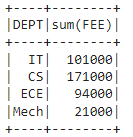
Example: Groupby with DEPT along with FEE with sum()
Python3
# importing module
import pyspark

# importing sparksession from pyspark.sql module
from pyspark.sql import SparkSession

# creating sparksession and giving an app name
spark = SparkSession.builder.appName('sparkdf').getOrCreate()

# list  of student  data
data = [["1", "sravan", "IT", 45000],
        ["2", "ojaswi", "CS", 85000],
        ["3", "rohith", "CS", 41000],
        ["4", "sridevi", "IT", 56000],
        ["5", "bobby", "ECE", 45000],
        ["6", "gayatri", "ECE", 49000],
        ["7", "gnanesh", "CS", 45000],
        ["8", "bhanu", "Mech", 21000]
        ]

# specify column names
columns = ['ID', 'NAME', 'DEPT', 'FEE']

# creating a dataframe from the lists of data
dataframe = spark.createDataFrame(data, columns)

# Groupby with DEPT along FEE with sum()
dataframe.groupBy('DEPT').sum('FEE').show()
Output:
Method 2: Using agg() function with GroupBy()
Here we have to import the sum function from sql.functions module to be used with the aggregate method.
Syntax: dataframe.groupBy("group_column").agg(sum("column_name"))
where,
- dataframe is the pyspark dataframe
- group_column is the grouping column
- column_name is the column to get sum
Python3
# importing module
import pyspark

# importing sparksession from pyspark.sql module
from pyspark.sql import SparkSession

# import sum
from pyspark.sql.functions import sum

# creating sparksession and giving an app name
spark = SparkSession.builder.appName('sparkdf').getOrCreate()

# list  of student  data
data = [["1", "sravan", "IT", 45000],
        ["2", "ojaswi", "CS", 85000],
        ["3", "rohith", "CS", 41000],
        ["4", "sridevi", "IT", 56000],
        ["5", "bobby", "ECE", 45000],
        ["6", "gayatri", "ECE", 49000],
        ["7", "gnanesh", "CS", 45000],
        ["8", "bhanu", "Mech", 21000]
        ]

# specify column names
columns = ['ID', 'NAME', 'DEPT', 'FEE']

# creating a dataframe from the lists of data
dataframe = spark.createDataFrame(data, columns)

# Groupby with DEPT and NAME with sum()
dataframe.groupBy("DEPT").agg(sum("FEE")).show()
Output:
Method 3: Using Window function with sum
The window function is used for partitioning the columns in the dataframe.
Syntax: Window.partitionBy('column_name_group')
where, column_name_group is the column that contains multiple values for partition
We can partition the data column that contains group values and then use the aggregate function of sum() to get the sum of the grouping(partitioning) column.
Syntax: dataframe.withColumn('New_Column_name', functions.sum('column_name').over(Window.partitionBy('column_name_group')))
where,
- withColumn() method is used to get the column name
- functions.sum('column_name') is to get the sum
- Window.partitionBy('column_name_group') is to partition the column with sum by group
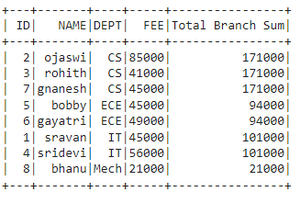
Example: Get the sum of fee based on the department
Python3
# importing module
import pyspark

# importing sparksession from pyspark.sql module
from pyspark.sql import SparkSession

# import functions
from pyspark.sql import functions as f

# import window module
from pyspark.sql import Window

# creating sparksession and giving an app name
spark = SparkSession.builder.appName('sparkdf').getOrCreate()

# list  of student  data
data = [["1", "sravan", "IT", 45000],
        ["2", "ojaswi", "CS", 85000],
        ["3", "rohith", "CS", 41000],
        ["4", "sridevi", "IT", 56000],
        ["5", "bobby", "ECE", 45000],
        ["6", "gayatri", "ECE", 49000],
        ["7", "gnanesh", "CS", 45000],
        ["8", "bhanu", "Mech", 21000]
        ]

# specify column names
columns = ['ID', 'NAME', 'DEPT', 'FEE']

# creating a dataframe from the lists of data
dataframe = spark.createDataFrame(data, columns)

# summing using window function
dataframe.withColumn('Total Branch Sum', f.sum(
    'FEE').over(Window.partitionBy('DEPT'))).show()
Output:
Explore
Python Fundamentals
Python Data Structures
Advanced Python
Data Science with Python
Web Development with Python
Python Practice