Form Validation in Django
Last Updated :
10 Nov, 2025
Form validation ensures that user-submitted data meets specific requirements before being processed or saved. It can be applied to fields such as username, gender, or text inputs to maintain accuracy and consistency. Django simplifies this process by combining form handling and validation logic within its form classes.
Example: Custom Validation with Django Forms
Consider a project named 'geeksforgeeks' having an app named 'geeks.
Step 1: Create the Model
In geeks/models.py, define a model named Post to store user data:
Python
from django.db import models

class Post(models.Model):
    MALE = 'M'
    FEMALE = 'F'
    GENDER_CHOICES = [
        (MALE, 'Male'),
        (FEMALE, 'Female'),
    ]

    username = models.CharField(max_length=20, blank=False, null=False)
    text = models.TextField(blank=False, null=False)
    gender = models.CharField(max_length=6, choices=GENDER_CHOICES, default=MALE)
    time = models.DateTimeField(auto_now_add=True)

    def __str__(self):
        return self.username
Step 2: Apply Migrations
After creating this model, two commands need to be run to create the corresponding database tables:
python manage.py makemigrations
python manage.py migrate
Creating a form involves defining validation rules for fields, such as requiring the username to be at least 5 characters and the post text to be at least 10 characters. These rules are implemented in the PostForm class.
In geeks/forms.py, define a form that includes custom validation logic:
Python
from django import forms
from django.forms import ModelForm
from .models import Post

class PostForm(ModelForm):
    class Meta:
        model = Post
        fields = ["username", "gender", "text"]

    def clean(self):
        cleaned_data = super().clean()
        username = cleaned_data.get('username')
        text = cleaned_data.get('text')

        # Validate username and text length
        if username and len(username) < 5:
            self.add_error('username', 'Minimum 5 characters required.')

        if text and len(text) < 10:
            self.add_error('text', 'Post should contain at least 10 characters.')

        return cleaned_data
Step 4: Define the View
In geeks/views.py, create a view to handle GET and POST requests.
Python
from django.shortcuts import render, HttpResponse
from .forms import PostForm

def home(request):
    if request.method == 'POST':
        form = PostForm(request.POST)
        if form.is_valid():
            form.save()
            return HttpResponse("Data submitted successfully.")
        return render(request, 'home.html', {'form': form})

    form = PostForm()
    return render(request, 'home.html', {'form': form})
In geeks/urls.py, map the root URL to the home view.
Python
from django.urls import path
from . import views

urlpatterns = [
    path('', views.home, name='home'),
]
Include app’s URLs in the project-level geeksforgeeks/urls.py:
Python
from django.contrib import admin
from django.urls import path, include

urlpatterns = [
    path('admin/', admin.site.urls),
    path('', include('geeks.urls')),
]
Step 6: Create the Template
In geeks/templates/home.html, design a simple form using Bootstrap for styling.
HTML
<!DOCTYPE html>
<html lang="en">
<head>
    <meta charset="UTF-8">
    <title>Django Form Validation</title>
    <link rel="stylesheet" href="https://maxcdn.bootstrapcdn.com/bootstrap/3.3.7/css/bootstrap.min.css">
</head>
<body style="padding-top: 60px; background-color: #f5f7f8;">
    <div class="container">
        <div class="row">
            <div class="col-md-4 col-md-offset-4">
                <h2>Post Form</h2>
                <form method="POST">
                    {% csrf_token %}
                    {{ form.as_p }}
                    <button type="submit" class="btn btn-primary">Submit</button>
                </form>
            </div>
        </div>
    </div>
</body>
</html>
Step 7: Run the Server
python manage.py runserver
Visit: http://127.0.0.1:8000/ to view the form in action
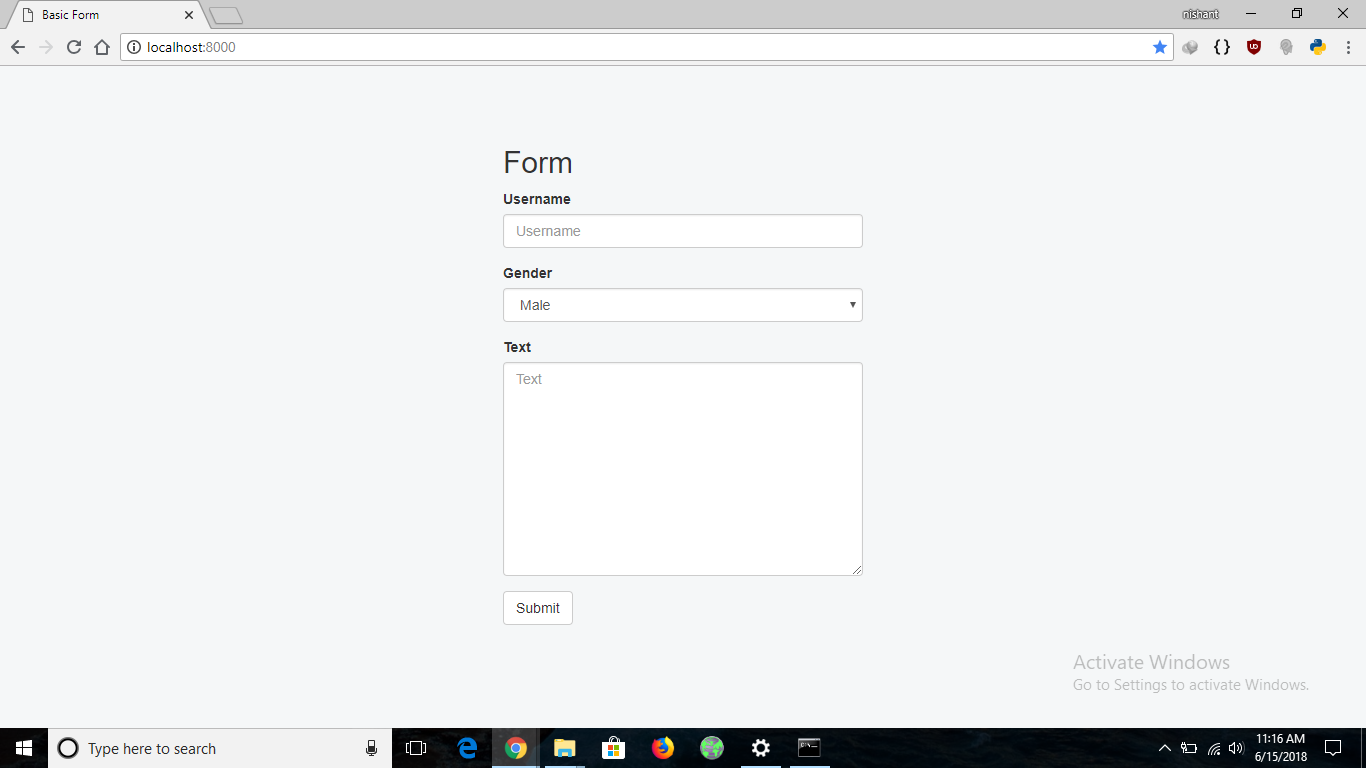
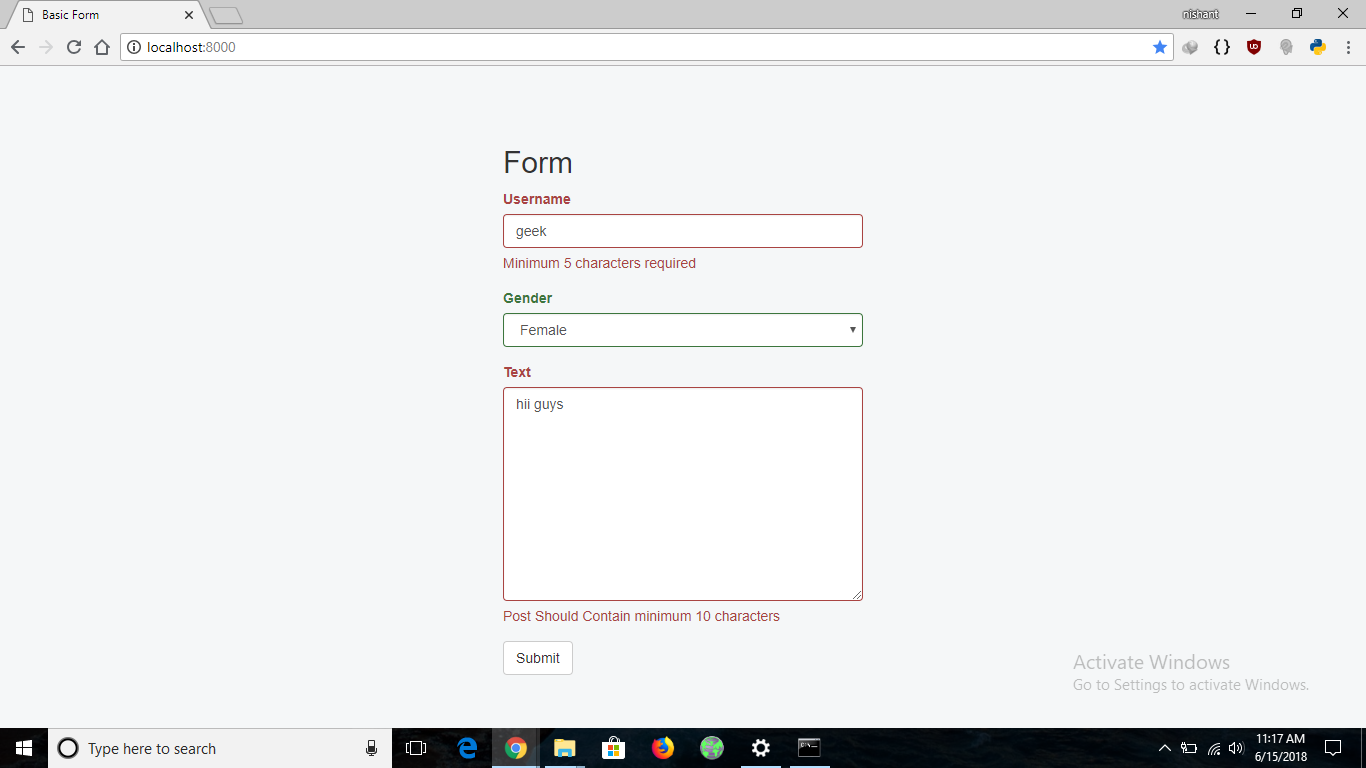
If the form is submitted with a username shorter than 5 characters or post text shorter than 10 characters, validation errors are displayed immediately. The form highlights the invalid fields and shows appropriate error messages.
Explore
Python Fundamentals
Python Data Structures
Advanced Python
Data Science with Python
Web Development with Python
Python Practice