
Categorical variables are non-numeric variables that represent groups or categories. In regression models, which typically require numeric inputs, handling categorical variables appropriately is crucial for building accurate and interpretable models.
Let's learn how to handle categorical variables in predictive analysis.
Handling Categorical Variables using One-Hot Encoding
One-hot encoding is used to convert categorical variables into a form that can be provided to a machine learning model.
To handle categorical variables in regression, we follow these steps:
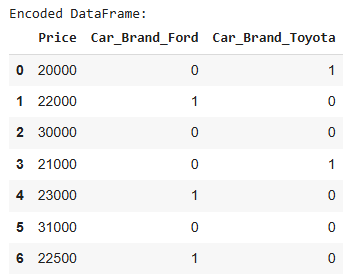
- One-Hot Encoding: Convert categorical variables into binary columns, where each column corresponds to a unique category of the variable.
- Regression: Once the categorical variables are encoded, they can be used as features (independent variables) in a regression model.
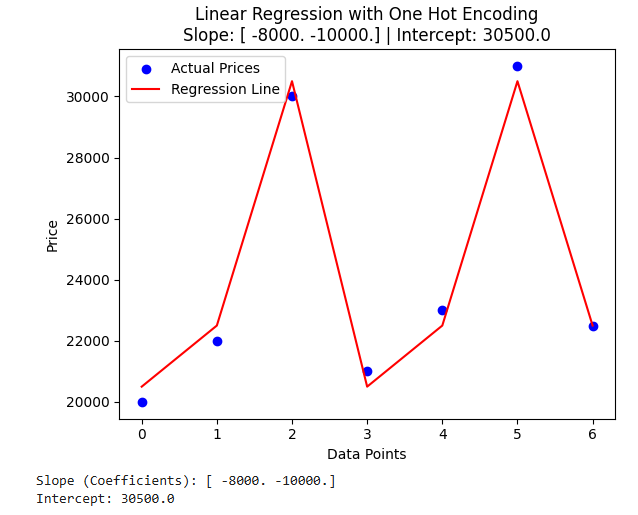
- Fit a Linear Regression Model: Use the encoded features along with a target variable to fit a linear regression model.
Car Price Prediction Example
Let's use a real-life scenario to demonstrate this — Car Price Prediction example, where we have a categorical variable Car_Brand and a numerical variable Price.
import pandas as pd
import numpy as np
import matplotlib.pyplot as plt
from sklearn.linear_model import LinearRegression

# 1. Sample Data (with categorical and numerical variables)
data = {
    'Car_Brand': ['Toyota', 'Ford', 'BMW', 'Toyota', 'Ford', 'BMW', 'Ford'],
    'Price': [20000, 22000, 30000, 21000, 23000, 31000, 22500]
}
df = pd.DataFrame(data)

# 2. One-Hot Encoding the Categorical Variable 'Car_Brand'
df_encoded = pd.get_dummies(df, columns=['Car_Brand'], drop_first=True, dtype =int)  # drop_first to avoid multicollinearity

# Print the encoded DataFrame
print("Encoded DataFrame:")
print(df_encoded)

# 3. Define independent variable (X) and dependent variable (y)
X = df_encoded[['Car_Brand_Ford', 'Car_Brand_Toyota']]  # Independent variables (one-hot encoded columns)
y = df_encoded['Price']  # Dependent variable

# 4. Perform Linear Regression
model = LinearRegression()
model.fit(X, y)

# 5. Get the regression line's coefficients
slope = model.coef_
intercept = model.intercept_

# 6. Predict the target variable
y_pred = model.predict(X)

# 7. Visualize the results
plt.scatter(range(len(y)), y, color='blue', label='Actual Prices')  # Actual data points
plt.plot(range(len(y)), y_pred, color='red', label='Regression Line')  # Predicted regression line
plt.xlabel('Data Points'
plt.ylabel('Price')
plt.legend()
plt.title(f'Linear Regression with One Hot Encoding\nSlope: {slope} | Intercept: {intercept}')
plt.show()

# Display the model's coefficients
print(f'Slope (Coefficients): {slope}')
print(f'Intercept: {intercept}')
Output:
Handling Categorical Variables in Regression Using Label Encoding
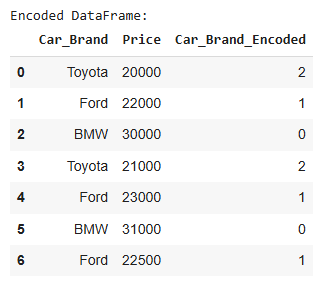
Label Encoding is a technique where each category in the categorical feature is assigned a unique integer value. This is different from One-Hot Encoding, where each category gets a separate binary column. Label Encoding is simpler and might be more appropriate for ordinal data (categories that have an intrinsic order), but it can also be used for nominal data in some cases.
To handle categorical variables using regression, the steps will be:
- Label Encoding: Convert the categorical variable into integers.
- Regression: Use the label-encoded feature and fit the regression model.
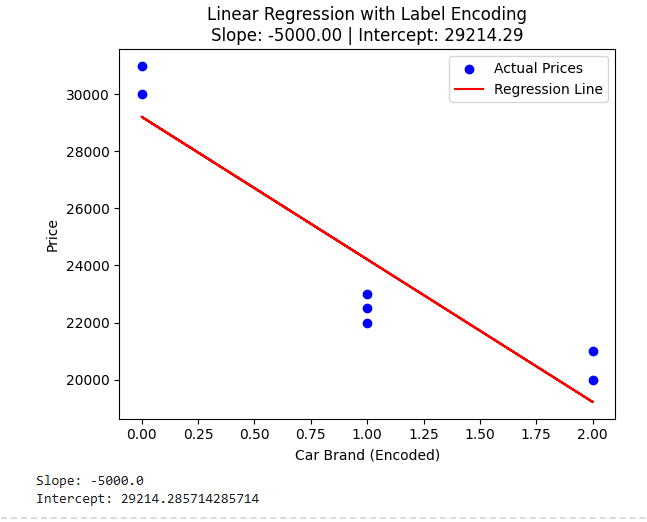
- Plot the Regression Line: Visualize how the regression line fits the data after encoding.
Example Code Using Label Encoding:
import pandas as pd
import numpy as np
import matplotlib.pyplot as plt
from sklearn.linear_model import LinearRegression
from sklearn.preprocessing import LabelEncoder

# 1. Sample Data (with categorical and numerical variables)
data = {
    'Car_Brand': ['Toyota', 'Ford', 'BMW', 'Toyota', 'Ford', 'BMW', 'Ford'],
    'Price': [20000, 22000, 30000, 21000, 23000, 31000, 22500]
}
df = pd.DataFrame(data)

# 2. Label Encoding the Categorical Variable 'Car_Brand'
label_encoder = LabelEncoder()
df['Car_Brand_Encoded'] = label_encoder.fit_transform(df['Car_Brand'])

# Print the encoded DataFrame
print("Encoded DataFrame:")
display(df)

# 3. Define independent variable (X) and dependent variable (y)
X = df[['Car_Brand_Encoded']]  # Independent variable (label encoded column)
y = df['Price']  # Dependent variable

# 4. Perform Linear Regression
model = LinearRegression()
model.fit(X, y)

# 5. Get the regression line's coefficients
slope = model.coef_[0]
intercept = model.intercept_

# 6. Predict the target variable
y_pred = model.predict(X)

# 7. Visualize the results
plt.scatter(X, y, color='blue', label='Actual Prices')  # Actual data points
plt.plot(X, y_pred, color='red', label='Regression Line')  # Predicted regression line
plt.xlabel('Car Brand (Encoded)')
plt.ylabel('Price')
plt.legend()
plt.title(f'Linear Regression with Label Encoding\nSlope: {slope:.2f} | Intercept: {intercept:.2f}')
plt.show()

# Display the model's coefficients
print(f'Slope: {slope}')
print(f'Intercept: {intercept}')
Output:
Apart from label encoding and one-hot encoding, we can handle categorical variables using binary encoding and target encoding to solve a regression problem.