
The split() function in p5.js is used to break the input string into pieces using a delimiter. This delimiter could be any string or symbol used between each piece of the input string. Syntax:
split(String, Delimiter)
Parameters: This function accepts two parameters which are described below:
- String: This is the input string which are to be splitted.
- Delimiter: This is any string or symbol used to separate the data of the input string.
Return Value: It returns the splitted data of the input string. Below programs illustrate the split() function in p5.js. Example 1: This example uses split() function to break the input string into pieces of substring using delimiter.
function setup() {

    // Creating Canvas size
    createCanvas(450, 150);
}
function draw() {

    // Set the background color
    background(220);

    // Initializing the Strings
    let String = 'GeeksforGeeks/Geeks/Geek/gfg';

    // Calling to split() function.
    let A = split(String, '/');

    // Set the size of text
    textSize(16);

    // Set the text color
    fill(color('red'));

    // Getting splitted string
    text("Splitted string is: " + A[0], 50, 30);
    text("Splitted string is: " + A[1], 50, 60);
    text("Splitted string is: " + A[2], 50, 90);
    text("Splitted string is: " + A[3], 50, 120);
}
Output: 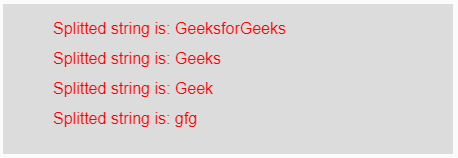 Example 2: This example uses split() function to break the input string into pieces of substring using delimiter.
function setup() {

    // Creating Canvas size
    createCanvas(450, 150);
}
function draw() {

    // Set the background color
    background(220);

    // Initializing the Strings
    let String = '0&11&222&3333';

    // Calling to split() function.
    let A = split(String, '&');

    // Set the size of text
    textSize(16);

    // Set the text color
    fill(color('red'));

    // Getting splitted string
    text("Splitted string is: " + A[0], 50, 30);
    text("Splitted string is: " + A[1], 50, 60);
    text("Splitted string is: " + A[2], 50, 90);
    text("Splitted string is: " + A[3], 50, 120);
}
Output: 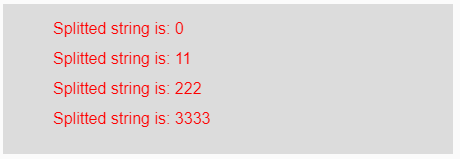 Reference: https://p5js.org/reference/#/p5/split