Array Basics Shell Scripting | Set 2 (Using Loops)
Last Updated :
18 Nov, 2025
It is recommended to go through Array Basics Shell Scripting | Set-1. Loops are the primary tool for working with arrays. After you've stored multiple items in an array, you'll need a loop to "iterate" over them, which means processing each item one by one.
You will use loops to:
- Run a command for every item in a list (e.g., ping every server in an array).
- Read user input and add each item to an array.
- Find a specific value within an array.
- Print all the values in an array in a clean, formatted way.
The Best Way to Loop Over an Array
This is the safest, simplest, and most common way to loop. The for...in loop iterates over each value in your array.
Create a file named loop_test.sh:
#!/bin/bash

# 1. DEFINE the array
servers=("web-01" "db-01" "app-01")

# 2. LOOP over the array
# "${servers[@]}" is the magic syntax
for srv in "${servers[@]}"; do
    echo "Processing server: $srv"
done
Output:

The Most Important Concept: "${arr[@]}"
"${arr[@]}" is the most critical part. This syntax tells the shell to expand the array into a list of separate, quoted items.
This is the only correct way to loop. Here is why:
Let's use an array with spaces: files=("File One.txt" "File Two.txt")
1. Correct: for f in "${files[@]}"
- What it does: The shell sees "File One.txt" and "File Two.txt".
- Result: The loop runs 2 times (Correct).
2. Wrong: for f in ${files[@]} (No quotes)
- What it does: The shell sees File, One.txt, File, Two.txt.
- Result: The loop runs 4 times (Buggy).
Loop by Index (while or C-style for)
Sometimes you need to know the index of the item you're on (e.g., "Item 0," "Item 1," etc.). You can't get this with a simple for...in loop.
The C-Style for Loop
This is the cleanest and most modern way to loop from 0 to the end of the array.
- ${#arr[@]}: This syntax gets the total number of elements in the array.
- ((...)): This is the modern shell "arithmetic" syntax.
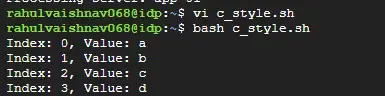
#!/bin/bash

arr=("a" "b" "c" "d")
count="${#arr[@]}" # count = 4

# Loop from i=0 up to (but not including) 4
for (( i=0; i<$count; i++ )); do
    echo "Index: $i, Value: ${arr[$i]}"
done
Output:
This is the most critical fix. The original article's method for this was incorrect. Here are the two correct ways to read user input into an array.
Method 1: Read All at Once (read -a)
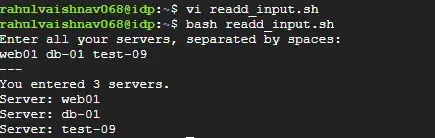
The read -a (array) flag will read a single line from the user, split it by spaces, and put the words into an array. This is fast and simple.
#!/bin/bash

echo "Enter all your servers, separated by spaces:"
read -a server_list

echo "---"
echo "You entered ${#server_list[@]} servers."
for srv in "${server_list[@]}"; do
    echo "Server: $srv"
done
Output:
Method 2: Read in a Loop
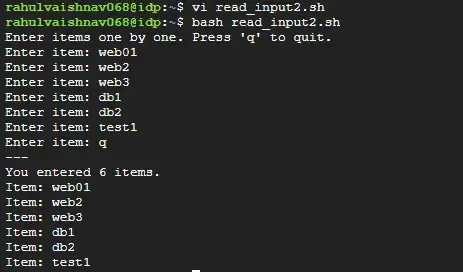
This is for when you want to prompt the user for each item, one at a time, until they signal they are done (e.g., by pressing Ctrl+D or entering "q").
#!/bin/bash

declare -a my_array
echo "Enter items one by one. Press 'q' to quit."

while true; do
    read -p "Enter item: " item

    if [[ "$item" == "q" ]]; then
        break # Exit the loop
    fi

    # This is the correct way to add an item to an array
    my_array+=("$item")
done

echo "---"
echo "You entered ${#my_array[@]} items."
for val in "${my_array[@]}"; do
    echo "Item: $val"
done
Output:
Explore
Getting Started with Linux
Installation with Linux
Linux Commands
Linux File System
Linux Kernel
Linux Networking Tools
Linux Process
Linux Firewall
Shell Scripting & Bash Scripting
Linux Administrator System