Integrating Electron with Angular 17
Last Updated :
13 Jun, 2024
Electron provides a platform for developing desktop applications using web technologies, while Angular offers a robust framework for building dynamic and interactive web applications. Integrating these two technologies enables developers to use their existing skills in Angular to create powerful desktop applications. This article explores the integration of Electron with Angular 17, allowing developers to build cross-platform desktop applications using the Angular framework.
Approach to Integrate Electron with Angular 17
Step 1: make a folder and install global angular CLI
The Angular CLI is based on Node, so provided that you have Node and NPM installed on your machine, you can simply run the following command to install the CLI.
npm install -g @angular/cli
Step 2: Create a project.
In your terminal, run the following command.
ng new <-your-project-name->
Now, Navigate to project directory.
cd <-your-project-name->
Project Structure
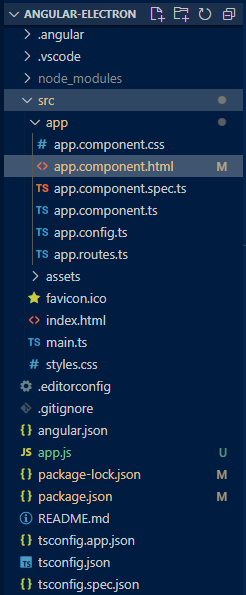 Folder Structure
Step 3: Installing & setting up Electron.
After creating the project for Angular, Electron can now be installed using the following commands.
npm install --save-dev electron@latest
Dependencies
"dependencies": {
    "@angular/animations": "^17.3.0",
    "@angular/common": "^17.3.0",
    "@angular/compiler": "^17.3.0",
    "@angular/core": "^17.3.0",
    "@angular/forms": "^17.3.0",
    "@angular/platform-browser": "^17.3.0",
    "@angular/platform-browser-dynamic": "^17.3.0",
    "@angular/router": "^17.3.0",
    "rxjs": "~7.8.0",
    "tslib": "^2.3.0",
    "zone.js": "~0.14.3"
  },
  "devDependencies": {
    "@angular-devkit/build-angular": "^17.3.6",
    "@angular/cli": "^17.3.6",
    "@angular/compiler-cli": "^17.3.0",
    "@types/jasmine": "~5.1.0",
    "electron": "^30.0.9",
    "jasmine-core": "~5.1.0",
    "karma": "~6.4.0",
    "karma-chrome-launcher": "~3.2.0",
    "karma-coverage": "~2.2.0",
    "karma-jasmine": "~5.1.0",
    "karma-jasmine-html-reporter": "~2.1.0",
    "typescript": "~5.4.2"
  }
Step 4: Now, create a 'app.js' in your root directory on project.
This app.js will be entry point for Electron in Angular.
HTML
<!-- src/app/app/app.component.html -->

<div class="container">
    <h1>My First Electron App</h1>
    <p>Welcome to my first Electron app!</p>
    <ul>
        <li>Integration of Electron with Angular</li>
        <li>'npm start' to run Electron</li>
    </ul>
</div>
// app.js

const { app, BrowserWindow } = require("electron");
const url = require("url");
const path = require("path");

let mainWindow;

function createWindow() {
    mainWindow = new BrowserWindow({
        width: 800,
        height: 600,
        webPreferences: {
            nodeIntegration: true,
            contextIsolation: false,
            enableRemoteModule: true,
        },
    });

    mainWindow.loadURL(
        url.format({
            pathname: path.join(__dirname, `/dist/angular-electron/browser/index.html`),
            protocol: "file:",
            slashes: true,
        })
    );

    mainWindow.on("closed", function () {
        mainWindow = null;
    });
}

app.on("ready", createWindow);

app.on("window-all-closed", function () {
    if (process.platform !== "darwin") app.quit();
});

app.on("activate", function () {
    if (mainWindow === null) createWindow();
});
Note: Here, in line with pathname, the build directory is '/dist/ang-electron/browser/index.html' and this is the standard path to follow, 'ang-electron' is the project name.
Step 5: Next, open the package.json file and add the app.js file as the main entry point of our project.
{
  "name": "ang-electron",
  "version": "0.0.0",
  "main": "app.js",
    // [...]
}
Next, modify the start script in the package.json file to make it easy to build the project and run the Electron application with one command.
"scripts": {
    "ng": "ng",
    "start": "ng build --base-href ./ && electron .",
    "build": "ng build",
    "watch": "ng build --watch --configuration development",
    "test": "ng test",
    "serve:ssr:ang-electron": "node dist/ang-electron/server/server.mjs"
  },
Step 6: Run Electron using npm.
npm start
It will open a window with following output.
Output
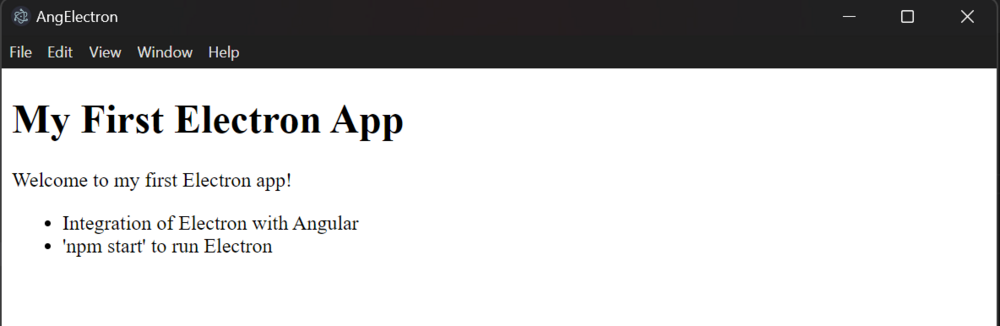 Integrating Electron with Angular 17
By following these steps and approaches, developers can effectively integrate Electron with Angular 17 to build robust and feature-rich desktop applications.
Explore
AngularJS Basics
AngularJS Directives
AngularJS Filters
AngularJS Converting Functions
AngularJS Comparing Functions
AngularJS Questions
AngularJS Examples
2 min read